Mobile Conversion Rate and Its Relationship with SEO
 Taha Yelkenci
Founder, SEO and GEO Consultant | | 7 min read
Mobile conversion rate is the percentage of visitors on mobile devices who complete a target action such as a purchase. When I wrote this article in 2019, mobile usage had climbed fast over the previous five years. Data published in 2018 showed mobile usage rising from 59% in 2017 to 67% in 2018, and it looks set to keep climbing.
But how many of those mobile users turn into customers? According to the published figures, the average conversion rate is 3.94% on desktop and 1.84% on mobile. Those are averages and will not hold for every sector. Using your Google Analytics data you can compare mobile and desktop conversion rates for your own industry. You can then build new actions from what you find.
Looking at those numbers, we can conclude that converting mobile users is harder than converting desktop users. So why do desktop visitors convert better?
- Desktop pages have better load speeds than mobile pages.
- Desktop users handle the main menu more comfortably and find what they want more easily.
- Filtering is more usable on desktop.
- On a desktop page the product image, description and reviews are clearer and easier to reach.
Every conclusion we can reach by researching those four reasons tells us what to improve on mobile. Not every conversion rate optimisation (CRO) strategy we use for desktop will work on mobile, but I would say the fundamentals are the same.
Even though the gap between desktop and mobile conversion is twofold, let's not forget that most traffic usually comes from mobile. The conversion rate we can improve on mobile may therefore earn more than the desktop one. That makes lifting mobile conversion a genuinely useful metric to work on.
Let's look at what we can do to optimise it.
In this article: mobile site performance, payment methods, on-site navigation, mobile UX and trust, product content, the category tree, and creating urgency.
1. Improving mobile site performance
Mobile pages generally load more slowly than desktop ones. Since speed is a critical metric, it deserves priority. 43% of users leave the site if a page takes longer than three seconds to load.
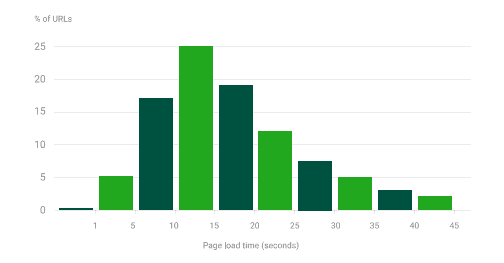
Average mobile load times have been published by sector, and three out of four sites averaged ten seconds. The same research emphasised that bringing the average below five seconds doubles the conversion rate. Speed up the mobile pages and mobile CRO can rise with them. Update (October 2026): Google's Core Web Vitals measure the loading, interactivity and visual stability of a page. For a good score, Largest Contentful Paint (LCP) should be under 2.5 seconds, Interaction to Next Paint (INP) under 200 milliseconds and Cumulative Layout Shift (CLS) under 0.1.
1.1 How can we improve mobile performance and page speed?
We can improve mobile performance and page speed with the three steps below.
- Examine every file loaded with the page. Some loaded files may not be used on that page at all. A CSS file might hold the rules for both the home page and the admin panel. Splitting the CSS minimises file size.
- Keeping image quality high is worthwhile, because visual quality helps the user examine the product. Just do not forget to optimise the file sizes.
- Rather than loading the whole page at once, prioritise loading it in layers. If the user's purpose is to inspect the product, loading the image first makes sense. These priorities can be tuned to user intent.
Five tools for mobile speed
The five tools I use to measure and improve mobile speed are below.
- Unused-CSS shows you the unused CSS rules on your pages.
- Pingdom shows you which files run in which order as your pages load.
- Dareboost does both of the above and goes as far as suggesting how to fix the problems it finds.
- The tool I use most: Chrome DevTools. For speed work it is the most useful of the lot.
- And for anyone who wants flawless results, Google Developers.
2. Enriching payment methods and simplifying checkout
Making users type extra information during checkout is tedious and hurts the sale. My view is always that the user should complete the purchase with the fewest possible clicks and fields. On mobile pages in particular, even a user who likes the product can struggle with entering payment details and give up. Optimising those steps lifts mobile CRO.
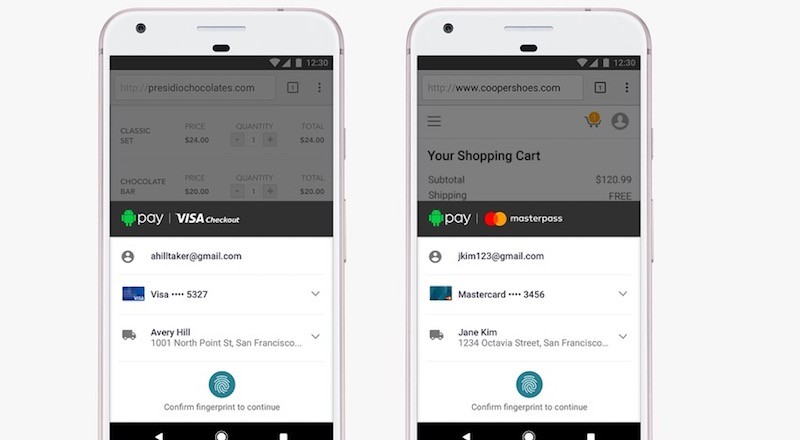
Here I would suggest Masterpass as an alternative payment method. On sites using it, the purchase can be completed by entering only a phone number and the code that arrives by SMS. That is two steps. Compare that with a credit card, where users can abandon at the tedious steps: card number, name, CVC, confirmation code. A shopper who still leaves at checkout can get an abandoned cart reminder, one of the workflows in my post on marketing automation tools.
2.1 Shorter mobile checkout forms
Mobile checkout forms are quicker when the browser can fill them in. Google's web.dev guide to payment and address forms recommends setting the HTML type and autocomplete attributes on each field. A field with type="tel" opens the phone keypad on mobile, and type="email" opens the email keyboard. The guide advises making guest checkout the default, so no account is needed to pay.
3. Improving on-site navigation
Optimising on-site navigation is hard on mobile sites, especially on e-commerce, and it is just as important. The user does not know where to tap, because they are meeting the site for the first time. Guiding them and meeting their need by the shortest route produces results.
3.1 Autocomplete in the search field

Autocomplete in the search field helps the user find what they came for. Amazon uses autocomplete well. On this topic you can read John Komarek's article, which shares tips on using in-place filtering.
4. Improving mobile user experience and trust
One of the feelings that triggers a purchase is trust. The look of the site, its design, its layout and its colours all become a measure of trustworthiness in the user's mind.
Our mobile site looks amateur and inspires no confidence if it cannot fulfil the user's purpose, if the infrastructure falls short, or if it is not easy to use.
In short, improving the experience will lift mobile CRO. So we need to make changes that let mobile users move around and find what they want with little effort.

On this product page, five elements the user needs through the purchase steps sit on the same screen: the rating, the quantity, the coupon field, add-to-cart and the product image. They can act on them without scrolling.
4.1 Social proof, security badges and calls to action
Social proof, security badges and clear calls to action carry that trust into the purchase step. Social proof means ratings, reviews and customer photos from earlier buyers. Security badges and a visible returns policy beside the payment step answer a first-time buyer's doubts. A call to action (CTA) such as "Add to basket" needs a touch target of about 48 by 48 device-independent pixels, the minimum web.dev recommends. Keep the main CTA above the fold, the area visible without scrolling.
5. Enrich your product content
We can enrich product content with video and natural product photography.
5.1 Video content for products
Video content for products matters because catching the user's attention is the first step towards a conversion. According to data from Wyzowl:
- 79% of consumers prefer to watch a video rather than read a product description.
- 84% of consumers bought something after watching a video.
- 90% of consumers watch videos on a mobile device.
To market video content we can open a video pop-up on mobile pages. It must be used in a way that does not irritate the user, and the video should give them everything they need to know about the product.
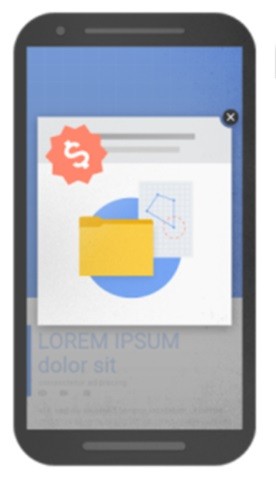
Do not show that pop-up always or the moment the page loads. Showing it after the user has scrolled two or three times or reached the product description improves the experience.
Used badly, a pop-up can damage your SEO. Update (October 2026): Google states that intrusive interstitials and dialogs make content harder to understand, which may lead to poor search performance. I would recommend this article on using pop-ups without hurting SEO and Rand Fishkin's video.
5.2 Natural product photography
Seeing a product only in terms of size, dimensions and colour is sometimes not enough. Knowing a wallet is 10x8 cm may not answer the real question: will it look big or small in my hand?

By discovering the details users pay attention to during the purchase, we can develop new ideas for images and content.
6. Optimising the category tree
One of the most important yet most overlooked aspects of mobile conversion is the product category page. Letting users reach what they want as easily and quickly as possible has a real effect on their decision to buy.
6.1 Four tips for category listings
The four tips below support conversion on category listings.
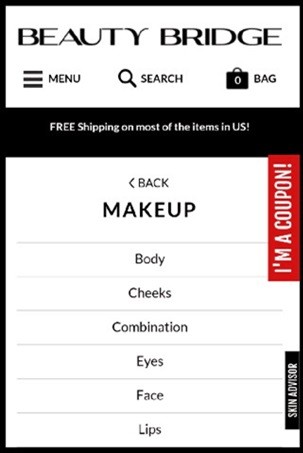
- Include a "Back" button in the category design.
- Make steps such as breadcrumbs wide and tappable.
- Present products in logical categories.
- Keep the most important categories (best-selling, highest-margin) easy to reach.
7. Creating a sense of urgency
In marketing, creating urgency works for lifting conversions. The finest example is the $717 billion spent worldwide on Black Friday. During short-lived discounts users feel that urgency and purchase rates rise.
7.1 Urgency needs an atmosphere of trust
A sense of urgency needs trust to come first. Speak the same language as your users. Whichever feature of your product beats the competition, highlight it by comparison.
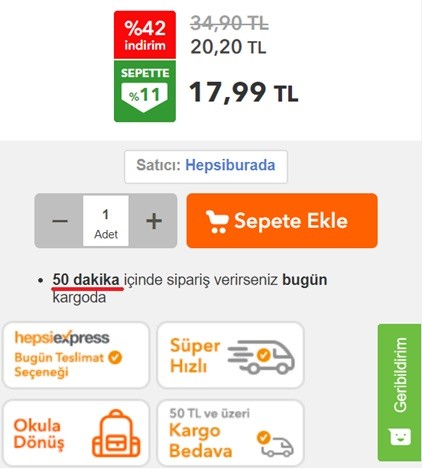
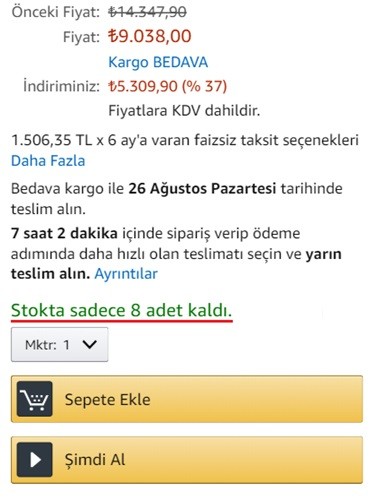
Trust is established around the price, and then urgency is created with a note such as "orders in the next 50 minutes ship today". Highlighting stock levels, as Amazon does, creates urgency too.
How do SEO and mobile CRO work together?
SEO and mobile CRO work together as two stages of the same sales funnel. SEO brings visitors from organic search, and CRO raises the share who take the desired action. Google indexes and ranks the mobile version of a site's content, a practice called mobile-first indexing. Google's ranking systems use Core Web Vitals, so the speed work in section 1 serves both goals. A page that does not answer its query loses the visitor before any CTA appears, as my post on user intent in SEO explains.
How do you measure and test mobile conversion rate?
Mobile conversion rate is measured in Google Analytics 4 with the session key event rate, filtered by the Device category dimension. My post on merging SEO data page by page shows how to join those figures with Search Console and crawl data.
Heatmaps and session recordings
Heatmaps and session recordings show where mobile users tap, how far they scroll and where they abandon a form. Microsoft Clarity provides both for free, along with funnels. Each pattern becomes a hypothesis to test, such as moving the CTA higher to lift add-to-basket clicks.
A/B tests that do not hurt SEO
A/B tests do not hurt SEO when they follow Google's guidance on website testing. The guidance sets four rules:
- Show Googlebot the same variants users see. Anything else is cloaking.
- Add
rel="canonical"to each variant URL, pointing to the original. - Use a 302 redirect, not a 301, when the test sends users to a variant URL.
- End the test once it has enough data, then remove the test elements.
Google Optimize closed on 30 September 2023, so tests now need a third-party tool.
I plan to keep updating this article with new tips as time allows. Leave a comment if you have original tips of your own.
Taha Yelkenci
SEO since 2010. Founder of rankZup. Got a question? Write to me →
Comments
Be the first to comment
← Previous post
Why User Intent Matters in SEO and Content Marketing [Video]
Next post →