Crawl Budget Optimization [Video]
 Taha Yelkenci
Founder, SEO and GEO Consultant | · updated: | 3 min read
![Crawl Budget Optimization [Video]](https://tahayelkenci.com/wp-content/uploads/2019/04/crawl-budget.png "Cover image of the post: Crawl Budget Optimization [Video]")

Crawl budget is the number of requests Googlebot makes to your site in a given period. Put more bluntly, it is the number of pages Googlebot crawls and the time it spends on the site. Update (October 2026): Google defines crawl budget as the set of URLs that Google can and wants to crawl.
By optimising crawl budget we can help Googlebot discover our important content more easily, crawl more of it, and control the time it spends.
Google re-crawls sites at regular intervals.
Gary Illyes of Google has explained that Google builds a list of the site's URLs before the crawl begins. The best outcome is Googlebot crawling every page on that list.
Googlebot works through the list from top to bottom. URLs that receive many internal links, along with sitemaps, help Google build that list in the first place. While crawling the list, Googlebot can meet negative conditions such as 40x and 50x errors or too many 30x redirects. In those cases Googlebot lowers the crawl budget, crawls fewer pages and leaves the site.
You can find how many pages Googlebot crawls on your site each day, and the average time it spends per page, in Search Console. Update (October 2026): Search Console shows this data in the Crawl Stats report under Settings, as total crawl requests, total download size and average response time.
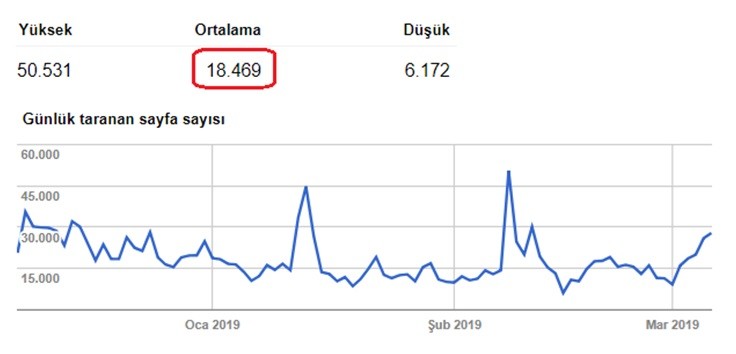
Why does optimising crawl budget matter?
Optimising crawl budget matters because Googlebot crawls only a certain number of pages on our site every day. Because it does not allocate us an unlimited budget, there are times when it cannot crawl everything. We need to make sure Googlebot crawls our most important pages if the budget is limited. Update (October 2026): Google wrote its crawl budget guide for sites with over 1 million pages that change weekly or over 10,000 pages that change daily.
Take an "About us" page: if we link to it from every page and list it near the top of the sitemap, Googlebot may crawl it daily. But is "About us" a page we target organic traffic with? Do we want Googlebot crawling it and spending even a small slice of the budget there? No.
When optimising crawl budget, the aim is to get Googlebot to prioritise the quality content pages we actually want traffic on.
What determines crawl budget?
Two factors determine crawl budget, according to Google's guide: the crawl capacity limit and crawl demand.
What is the crawl capacity limit?
The crawl capacity limit, known as hostload, caps the number of parallel connections Googlebot opens to your server and their duration. The limit rises while response times, including Time to First Byte (TTFB), stay stable. The limit falls when responses slow or the server returns 5xx errors or HTTP 429. All Google crawlers share this capacity, so high demand from one bot can leave less for the others.
What is crawl demand?
Crawl demand is how much Google wants to crawl the URLs on your site. Google names three factors you can influence.
- Perceived inventory: without guidance, Google tries to crawl every URL it knows. Duplicate, removed or unimportant URLs waste crawl time.
- Popularity: popular URLs get crawled more to stay fresh.
- Staleness: Google recrawls pages to pick up changes.
Low crawl demand means Google crawls your site less, even when the capacity limit is not reached.
How often will Google crawl my site?
Google crawls a site at the rate its crawl demand and capacity limit allow, with no fixed schedule. A site whose important content changes often is crawled at a high rate, whatever its size.
How do you increase crawl budget?
You increase crawl budget in two ways, according to Google. The first is adding server resources, for example when the URL Inspection tool reports "Hostload exceeded". The second is raising content quality for the Google product you target, which for Google Search covers popularity, user value, uniqueness and serving capacity.
How can we optimise crawl budget?
We can optimise crawl budget with the three pieces of work below.
- Site speed
- Clearing out unnecessary pages and keeping them out of the index
- Server analysis
Site speed optimisation
Site speed optimisation cuts the time Googlebot spends downloading a page and raises the number of pages it crawls. I will not go into how to improve site speed here. There are plenty of tools and articles on PageSpeed already.
Instead let me share an experience. A client of mine had content pages that needed updating every single day, and not a small number of them: more than 500 a day. Imagine changing the title of 500+ pages daily. When yesterday's index showed in Google's results, the click-through rate (CTR) was low. When the index was refreshed daily, the CTR doubled. That mattered enormously to us.
So we asked how we could raise PageSpeed and get Googlebot to crawl more pages. We went through every externally called resource and every file on the server that loads with the page, and optimised them. That work reduced Googlebot's "time spent downloading a page".
In the image below you can see the "time spent downloading a page" line falling. Look at the "pages crawled per day" line and you see it rising in inverse proportion.
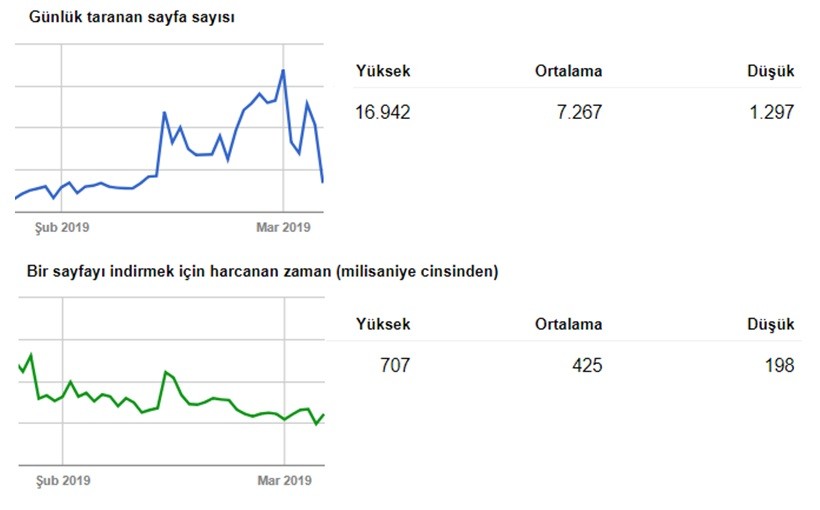
To sum the chart up: when the time Googlebot spends per page falls, the number of pages it crawls rises.
Get rid of the unnecessary pages on your site
Unnecessary pages abuse crawl budget, on e-commerce sites in particular: pointless content pages, needless parameters, products that read as duplicates. Using noindex and canonical tag best practices is usually the healthiest way to keep those to a minimum.
Once you have removed the unnecessary pages and want them out of Google's index, gather them all into a file and build a temporary sitemap. Submit it to Google and you will speed up their removal from the index. Alongside that you can block the unnecessary pages in robots.txt. As a final step you can delete the temporary sitemap from Search Console. Update (October 2026): Google never sees a noindex tag on a page blocked by robots.txt, so a page that carries noindex must not be blocked by robots.txt.
Check your redirects
While clearing out unnecessary pages, redirects get added to the removed pages. Keeping track of redirected URLs becomes hard if your site has hundreds of thousands of products or sub-pages. You end up with situations like this: page A redirects to page B. A month later B redirects to C. As the number of redirects grows, so do the chains.
Try to keep those chains to a minimum. When B is redirected to C, for example, redirect A straight to C instead of letting it pass through B.
Redirect chains multiply crawl requests. The Crawl Stats report counts every request in a server-side redirect chain separately, so a chain from A to B to C costs three requests.
Do not use canonical tags on 404 pages
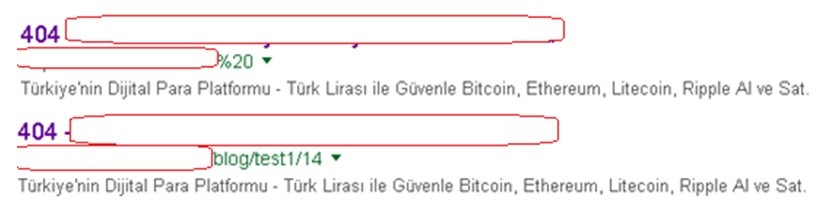
We mostly see canonical tags on 404 pages at companies developing their own software in-house. It does not come up with WordPress or the large e-commerce platforms, but using a canonical tag on 404 pages can get those 404s indexed. You can end up with pointless indexed pages like the ones below if you use a canonical on your 404 pages and no noindex.
Control faceted navigation URLs
Faceted navigation URLs are the parameter URLs that filters such as colour or size create on listing pages. Google's faceted navigation guide explains that crawlers only learn a filter URL is useless after crawling it, which slows the discovery of new pages. When filtered pages do not need to appear in search, Google recommends a disallow rule in robots.txt. Do not use noindex to save crawl budget, because Googlebot still requests the page to see the rule.
Monitor server errors and status codes
Monitoring server errors matters because 5xx responses and connection timeouts slow Google's crawling. Pages returning 4xx codes (except 429) do not waste crawl budget, according to Google's crawling myths page. For permanently removed pages, such as discontinued products, return a 404 or 410, because a 404 is a strong signal not to crawl that URL again.
Analyse your crawl budget
You have optimised your crawl budget, so how do you measure it? Crawl budget analysis runs on server logs and looks for the answers to three questions.
- How often does Googlebot come to the page?
- Which page does it crawl most?
- How much data does it download while crawling page X?
To answer those three questions you need to analyse your server's daily logs. You can build tables in Excel and interpret them, but my recommendation is to use a tool.
Splunk, Logentries or Stackify will all do the job. Update (October 2026): the Logentries address (logentries.com) now redirects to the Rapid7 site, while the Splunk and Stackify sites are live.
Log analysis is a subject in its own right. There is a whole article in it. I will write one if there is demand. Update (October 2026): I wrote it, see log file analysis for SEO.
What does the Google leak show about page change history?
The Google leak shows attributes that store a page's change history. The leaked Content Warehouse documentation contains a module called CrawlerChangerateUrlChangerate with change-rate information for a document. A related urlHistory attribute keeps up to the last 20 changes of a document. Four of the descriptions map to data you hold yourself:
- lastFetched: the last time Google saw a fetched copy of the document. Compare it with the last Googlebot request in your server logs.
- lastChanged: the last time Google saw a changed copy. Compare it with the date you last changed the main content.
- lastChangeSignificance: the significance of the last change, from 0 to 1, which content changes influence. Its description says it can be used to prioritise the crawl.
- isImsNotModified (in CrawlerChangerateUrlVersion): whether a crawl got a 304 Not Modified response, which your server logs show.
Put these dates side by side for each important URL. A page whose main content changed but which has had no Googlebot request since needs a check of its sitemap lastmod and its internal links. Google's crawl budget guide recommends the <lastmod> tag for updated content and a 304 response for pages that have not changed since the last crawl. My leak audit guide shows how to compare the date signals on your own pages. The documentation shows that these attributes exist, but their weight in crawl scheduling and their live use are unknown.
Taha Yelkenci
SEO since 2010. Founder of rankZup. Got a question? Write to me →
Comments
Be the first to comment
← Previous post
You might also like
August 10, 2020 · 3 dk
December 6, 2019 · 3 dk
October 24, 2019 · 3 dk