What Is Canonicalization? Canonical Tag Best Practices
 Taha Yelkenci
Founder, SEO and GEO Consultant | · updated: | 3 min read
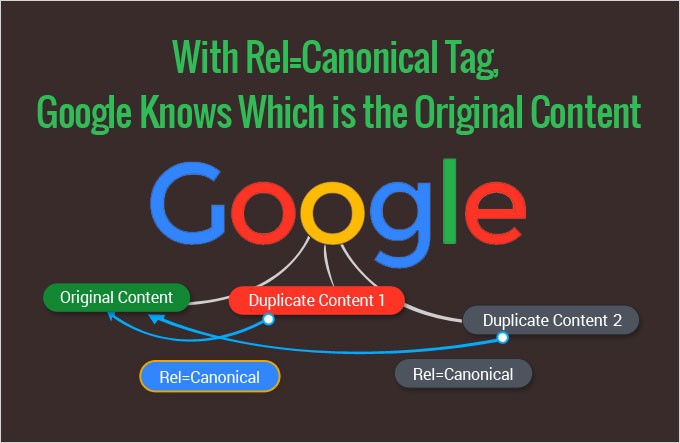
What is canonicalization?
Canonicalization is the process of selecting the representative URL, the canonical URL, from a set of URLs that hold the same or near-identical content. Search engines can create SEO problems for you if you have several URLs holding the same or similar content and answering the same query. This problem is called duplicate pages. Duplicate pages cause search engines to pick a weaker URL instead of the original one, and lead to poor ranking performance. The canonical tag tells search engines which URL you prefer and reduces that problem. Canonical tag best practices, the subject of this post, keep that signal consistent across your site.
Why canonicalization matters
Canonicalization matters because it decides which URL appears in search results and collects the signals of a duplicate set. Google's guide to consolidating duplicate URLs gives these reasons to specify a canonical:
- You choose the URL people see in search results, such as a clean URL instead of one with a tracking parameter.
- Links from other sites (link equity) and other signals are consolidated into one preferred URL.
- Googlebot spends less crawl time on duplicates and more on new or updated pages.
Google clusters similar pages and picks the canonical during indexing, a step I explain in my SEO guide.
How to write a canonical tag
A canonical tag is a <link> element with rel="canonical" that you write in the <head> section of a page. Here is one for a product page that is reachable at a second address, "/dresses/green-dress?color=green":
<link rel="canonical" href="https://www.example.com/dresses/green-dress" />
Google's documentation sets five rules for the tag:
- Google accepts the tag only in the
<head>section. A canonical placed in the body is ignored. - Use an absolute URL ("https://www.example.com/page/"), not a relative path ("/page/").
- Add a self-referencing canonical to the canonical page itself.
- Send a
rel="canonical"HTTP header for PDFs and other non-HTML files. - Give each page of a paginated listing its own canonical URL. Google's pagination guide says not to use page 1 as the canonical for the whole series.
The most common URL mistakes
Multiple URLs for the home page
On a site I consulted for, the home page had several URLs: "http://site.com", "https://site.com", "http://www.site.com", "https://www.site.com".
When I checked the canonical tags they all shared a common canonical. Is a shared canonical enough? No. Even when pages with identical content share a canonical, you should consolidate them onto a single URL with a 301 redirect.
Parameters appended to the URL
Parameters appended to the URL are common on e-commerce sites and can generate duplicate pages. On a site we worked with, values such as "?mounth=100" and "?mounth=500" were being appended to URLs, generating unnecessary duplicate pages. Each of those pages carried a canonical identical to its own URL.
The page "site.com/canonical?mounth=100" listed "site.com/canonical?mounth=100" as its canonical address.
We could have removed those pages altogether so they were never served, but those URLs were picking up links from other sites. So instead we set a shared canonical for every URL with an appended value: "site.com/canonical".
Now, even when a user is on "/canonical?mounth=100", search engines know the real page is "/canonical".
Chained canonicals
Do not build chains where page A's canonical is B, B's canonical is C and C's is D. Chained canonicals send search engines a confused signal. Aim for the shortest, clearest signal you can.
Conflicting canonical signals
Conflicting canonical signals occur when one page declares different canonical URLs through different methods, such as one URL in the sitemap and another in the rel="canonical" tag. Google's guide tells you to avoid that mix and to link internally to the canonical URL. Listing non-canonical URLs in the XML sitemap is one of the errors in my common SEO mistakes post.
How to check and fix canonical URLs
You check canonical URLs with the URL Inspection tool in Google Search Console. For an indexed page it shows the user-declared canonical and the Google-selected canonical. A mismatch means Google chose a different URL from the one you declared, and Search Console labels the page "Duplicate, Google chose different canonical than user".
Google's guide to fixing canonicalization issues names the common causes: incorrect canonical elements from a content management system (CMS) or plugin, misconfigured servers, hacked sites, syndicated content and copycat sites. For syndicated content it recommends that partners block indexing of the copy rather than rely on the canonical tag.
Pages you want indexed separately need clearly different content. After the fix, the Request Indexing button in the URL Inspection tool asks Google to re-evaluate them. Google can keep pages in a duplicate cluster for up to two weeks.
The best ways to use the canonical tag
Use a canonical on your home page
Parameters added to measure traffic can create duplicate versions of the home page. Referral parameters ("?refdomain=a.com") and Google Ads parameters (called AdWords when this post was written, "?url={lpurl}") are two examples. Use one shared canonical across all of them.

Consolidate pages that are close to each other
One of the most common mistakes is to focus canonical work only on exact duplicates and overlook pages that are close to each other. The canonical tag should be used for pages that are similar or that answer the same query. For example: you have a sales page titled "istanbul plane tickets" and a blog post titled "istanbul plane ticket prices". The two are not identical, but because they can answer the same query they can share a canonical.
Update (October 2026): Google treats the rel="canonical" tag as a hint, not a rule, and picks the canonical URL itself. Google's canonicalization documentation defines the process for duplicate and near-duplicate pages. On two pages with clearly different content, Google can choose a different URL from the one you prefer.
Content consolidation
Content consolidation is the process of removing pages with low-value content and pages that could be read as duplicates. Before you remove a page, use these five questions to decide whether it is valuable:
- Does the page get traffic and produce conversions? Check in Google Analytics.
- Does the page have valuable backlinks that help the site? Majestic, Moz, Ahrefs or Search Console will tell you.
- Does the page answer a query or add value for your audience? Does it entertain or educate?
- Does the page encourage people to stay on the site? Google Analytics and Metrica will show you.
- Is it a page you sell from? Is it a page you have a conversion goal on?
It is time to start consolidating if the answer to those questions is no.
Consolidation has three benefits:
- You strengthen the relationship with your audience by serving only current, accurate information.
- You waste less crawl budget.
- You get rid of pages that read as duplicates.
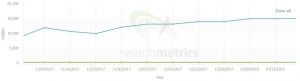
With one company I consulted for, content consolidation lifted SEO visibility from 11,678 to 14,715 (a gain of about 26%).
301 redirects and canonical tags
Sometimes you cannot remove similar pages and 301 them. In that case, is changing only the canonical tag enough to carry that page's value (its page authority and backlinks)? The honest answer is that it is not certain. Update (October 2026): Google's guide to consolidating duplicate URLs lists both redirects and rel="canonical" as strong canonicalization signals, and sitemap inclusion as a weak one.
Say we have pages A1 and A2. Visitors landing on A1 go straight to A2 and never see A1 if we redirect A1 to A2.
Visitors can still reach A1 if we do not redirect and only change the canonical tag, even though the canonical points at A2.
The choice between a 301 redirect and a canonical tag depends on the situation. Make sure the one you choose lines up with the conversion you are after.
How does the Google leak describe duplicate URLs?
The Google leak describes duplicate URLs as two lists attached to a canonical URL. In the leaked Content Warehouse documentation, the document record has an attribute called forwardingdup and one called extradup. The CompositeDocForwardingDup module defines the first list:
| Attribute | What its description says |
|---|---|
| forwardingdup | The top forwarding duplicates of the canonical URL. A purposes attribute records whether a duplicate forwards signals and anchors generally, forwards only one signal such as the click signal NavBoost, or serves another purpose. |
| extradup | The top non-forwarding duplicates of the canonical URL. |
Google's guide to consolidating duplicate URLs says signals such as links to a duplicate are consolidated into the preferred URL when that URL becomes canonical. Your first check is the Google-selected canonical in the URL Inspection tool. Point redirects, rel="canonical" and the sitemap at the same URL, since Google says these methods become more effective when combined. Internal links should point there too. To find near-duplicates before Google clusters them, use the template text check from my leak audit guide.
The documentation does not say which duplicates enter the forwarding list, or whether a redirect and a canonical tag differ there. The weight of both lists is unknown.
Taha Yelkenci
SEO since 2010. Founder of rankZup. Got a question? Write to me →
Comments
Be the first to comment
← Previous post
You might also like
August 10, 2020 · 3 dk
January 24, 2020 · 3 dk
December 6, 2019 · 3 dk