The Best SEO Practice for Discontinued Products
 Taha Yelkenci
Founder, SEO and GEO Consultant | · updated: | 3 min read

The best SEO practice for a discontinued product is to keep the page live when the product is temporarily out of stock. When the product is removed for good, 301 the page to a relevant page or return a 404. When products in an e-commerce store go out of stock temporarily or permanently, those product pages become unusable. So what should you do to handle that as well as possible for both SEO and user experience (UX)?
There is no single right answer to what you should do with a discontinued product page. The answer changes with the situation, based on these 3 questions:
- Does the product page receive organic traffic?
- Does the page have valuable backlinks?
- Was the product removed temporarily or permanently?
Variables similar to these 3 questions can apply.
These questions are worth asking, because they affect your site's technical optimisation, its user experience and its SEO.
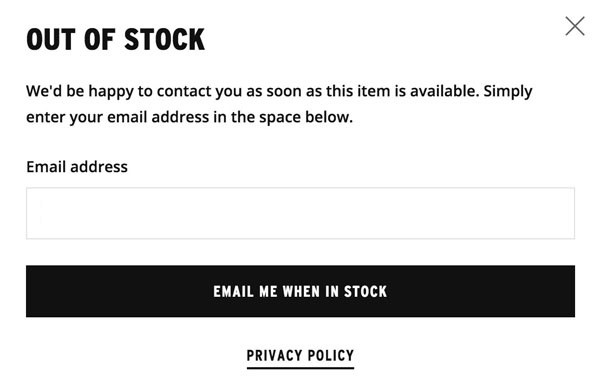
If the product is out of stock temporarily
The best option is to leave the page live rather than close it if the product has only been pulled temporarily. Since the page will be unusable only for a while, it is perfectly reasonable not to want a 404 or a 301 on it.
You will, however, need a few changes from the technical team, because you have to tell users the product is not on sale. Dropping a user onto a page for a product they cannot buy hurts the experience. Explain that the product is temporarily unavailable and, where possible, when it will be back. Remove the add-to-cart function as well to avoid confusion. Update (October 2026): Google's product structured data documentation reports stock status through the availability property, and the value for an out-of-stock product is OutOfStock.
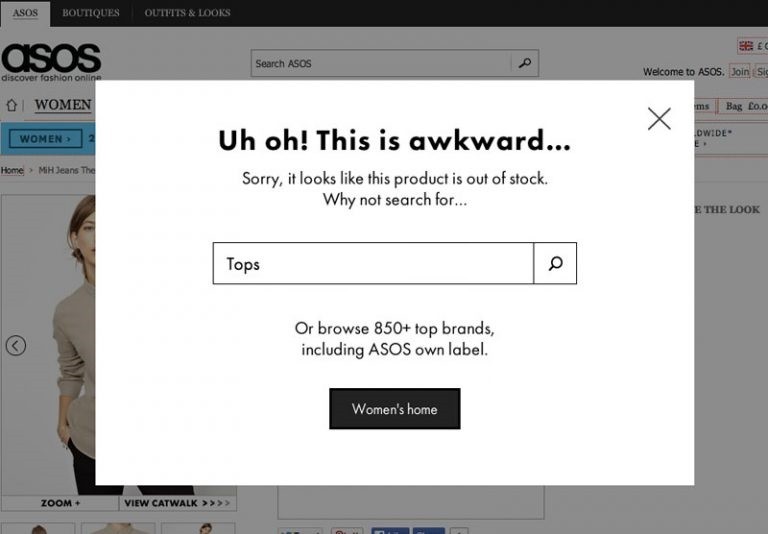
Remember that a user landing on an out-of-stock page has a bounce rate of 100%. You can do 3 things to reduce the bounce rate. Offer similar products as alternatives, bring the search function forward, and add a sign-up form that emails the user when the item is back in stock. Sending that back-in-stock email is a trigger-based workflow, the kind my post on four marketing automation tools describes.
What to do when a product is removed permanently
When a product is removed permanently there are 2 options: let the page return a 404, or redirect it with a 301 to a relevant page.
The first is simply to let the page return a 404. For mid-sized e-commerce sites this can be the answer. Matt Cutts says in one of his videos that you can resolve the situation with a 404. Since we are sure the product will never be sold again, serving a 404 makes sense: the page will bring you nothing from here on. But instead of a standard 404, you can improve the experience by recommending related products.
One thing to watch: 404 pages are disliked by users and by Google alike. Serving 404s means Googlebot keeps crawling pages that no longer exist, and part of your crawl budget is wasted. Update (October 2026): Google's crawl budget guide recommends returning a 404 or 410 for permanently removed pages, because a 404 is a strong signal not to crawl that URL again. According to the same guide, the pages that waste crawl budget are soft 404 pages, which Google keeps crawling.
At this point you should assess whether the page receives organic traffic and, more importantly, whether it has quality backlinks. Serving a 404 throws away everything the page earned. Remember that backlinks are among the most important factors in SEO.
So if you have a product that will never be sold again, redirecting the page with a 301 to a relevant page is the sensible move. The 301 redirect protects the backlinks, the organic visits and the value of the product page. I covered whether redirects lose PageRank in the redirects section of the 2017 trends post.
Before disposing of removed product pages, check what they are worth. Tools such as Ahrefs, Majestic and Moz will tell you.
Make sure the page you 301 to is as relevant as possible. Bearing in mind that the destination product could itself be discontinued one day, redirecting either to the category page or to a similar product is sensible.
From a UX point of view, redirecting without explaining anything can degrade the experience. Tell the user with a dynamic message that the product is out of stock and that is why they were redirected. The products on the new page then have a real chance of interesting them.
Taha Yelkenci
SEO since 2010. Founder of rankZup. Got a question? Write to me →
Comments
Be the first to comment
← Previous post
You might also like
August 10, 2020 · 3 dk
January 24, 2020 · 3 dk
December 6, 2019 · 3 dk